
2026.04.11 / 동준상.넥스트플랫폼
(AWS SAA, AWS AIF, GCP GenAI Leader)
서론: Vertex AI Studio 개요
- 이번 가이드는 AI 네이티브 클라우드 아키텍처를 실무 활용 방식으로 이해하기 위한 핸즈온 지원 문서입니다.
- Vertex AI는 예측형 및 생성형 AI 기능을 모두 제공하는 종합적인 머신러닝 개발 플랫폼으로, 사용자가 예측 모델을 학습 및 배포하는 것뿐만 아니라, 생성형 AI 모델을 탐색, 튜닝 및 서비스할 수 있도록 지원합니다.
- 특히 Vertex AI Studio는 머신러닝에 대한 광범위한 배경지식 없이도 직관적인 UI를 통해 생성형 AI 솔루션을 신속하게 프로토타이핑할 수 있는 환경을 제공하므로 기획, 운영, 개발 등 다양한 직군 종사자가 자신의 업무 목적에 맞게 활용할 수 있는 사용성 높은 도구입니다.
1. 실습 핵심 정리 (Executive Summary)
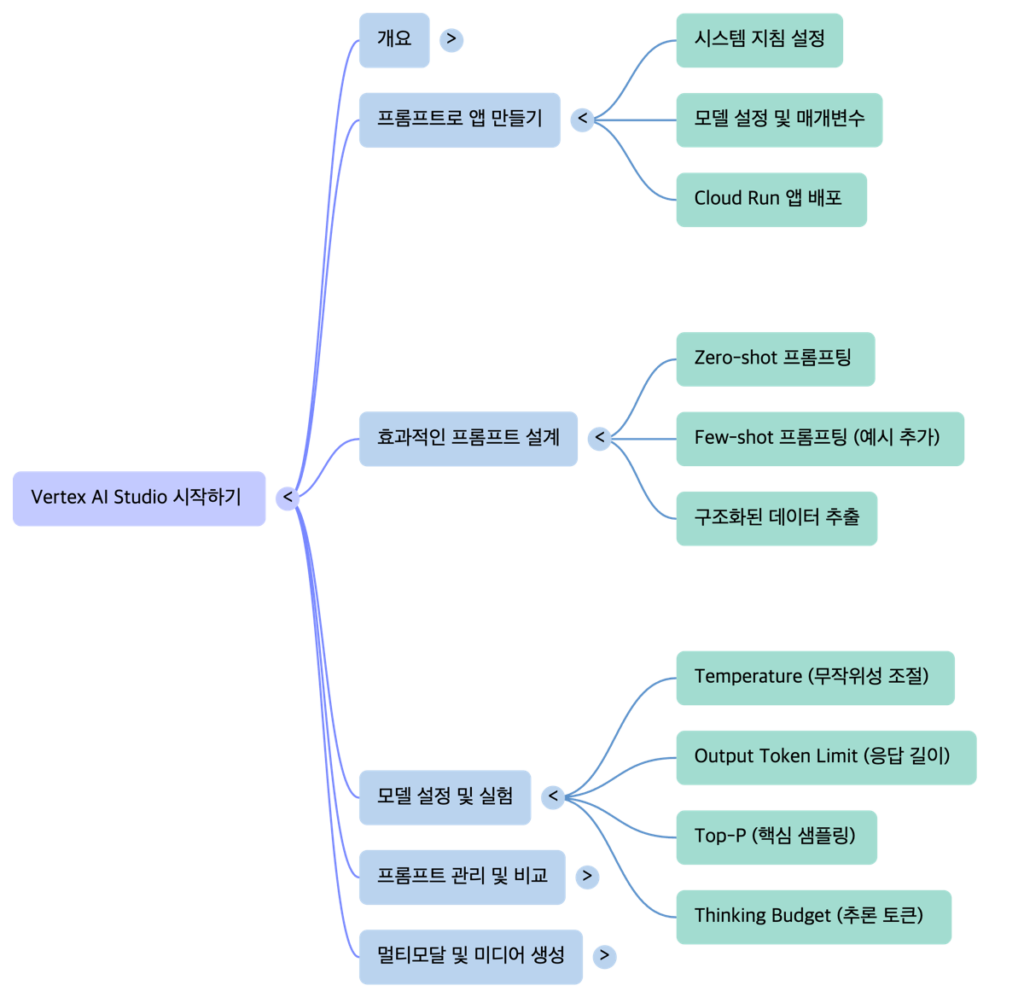
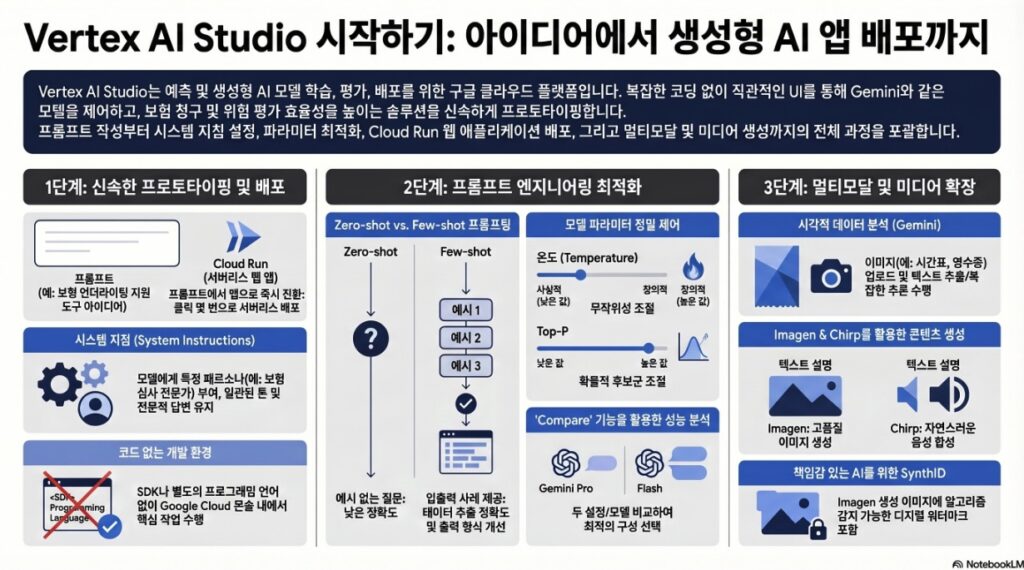
- 신속한 프로토타이핑 및 배포: Vertex AI Studio는 코드 작성이나 복잡한 SDK 사용 없이도 프롬프트 설계부터 웹 애플리케이션 배포(Cloud Run 연동)까지의 전체 사이클을 지원한다.
- 정밀한 프롬프트 엔지니어링: 제로샷(Zero-shot) 및 퓨샷(Few-shot) 프롬프팅 기술과 다양한 모델 설정 파라미터를 통해 출력의 정확도와 창의성을 제어할 수 있다.
- 비교 및 평가 도구: ‘비교(Compare)’ 기능을 통해 서로 다른 모델, 시스템 지침, 파라미터 설정을 나란히 놓고 성능을 최적화할 수 있다.
- 멀티모달 및 미디어 생성: 텍스트뿐만 아니라 이미지 분석(Gemini), 이미지 생성(Imagen), 음성 생성(Chirp) 등 다양한 미디어를 처리하고 생성하는 강력한 역량을 보유하고 있다.
실습 주요 단계
| 작업 명칭 | 주요 목표 | 기대 결과물 |
| 보험 위험 요약 프로토타입 앱 배포 | 고객 정보를 요약하고 위험 요소를 식별하는 생성형 AI 어시스턴트 프로토타입 개발 및 앱 배포 | Cloud Run을 통해 배포된 웹 애플리케이션 및 고객 요약/위험 분석 결과 |
| 프롬프트 비교 분석 (위험 요소 식별) | 시스템 지침 및 모델 설정(Thinking Budget 등)의 차이가 복잡한 추론 결과에 미치는 영향 분석 | 두 모델/설정 간의 정밀도 및 추론 깊이 차이가 보이는 나란히 배치된 응답 |
| Few-shot 기반 보험 청구 데이터 추출 | 예시(Few-shot)를 제공하여 비정형 데이터 추출의 정확도와 출력 형식의 일관성 향상 | 예시 형식을 정확히 따른 정교한 데이터 추출 결과 |
| Zero-shot 기반 보험 청구 데이터 추출 | 예시 없이 비정형 보험 청구 알림에서 주요 데이터 포인트 추출 및 구문 분석 | 정해진 형식(key: value)에 따른 데이터 추출 목록 |
| 멀티모달 이미지 분석 (시간표) | 이미지 데이터를 입력받아 텍스트 추출 및 시각적 정보를 바탕으로 한 비즈니스 로직 추론 수행 | 이미지 텍스트 캡처 및 비즈니스 로직에 따른 계산 결과 |
| 미디어 생성 (이미지 및 음성) | 텍스트 프롬프트를 사용하여 고품질 이미지 생성 및 텍스트의 음성 합성(TTS) 수행 | 생성된 이미지 4장 및 합성된 오디오 파일 |
| 프롬프트 설정 실험 (Insurance Story) | 매개변수 변경(Temperature 등)에 따른 모델의 창의성 및 응답의 결정론적 변화 관찰 | 설정값 변화에 따른 창의적 또는 결정론적인 텍스트 응답 |
2. 생성형 AI 프롬프트 설계 및 관리
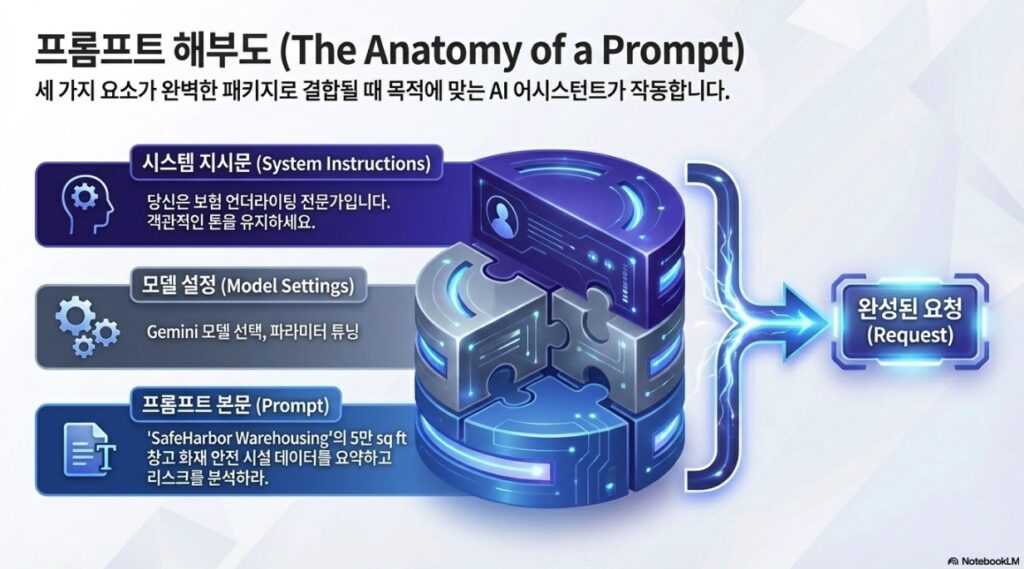
Vertex AI Studio의 사용자 인터페이스는 모델의 성능을 극대화하기 위해 세 가지 핵심 섹션으로 구성된다.
2.1 UI 구성 요소
| 구성 요소 | 설명 |
| 시스템 지침 (System Instructions) | 모델이 프롬프트를 처리하기 전에 수행해야 할 역할이나 제약 조건을 정의한다. 전체 대화에 적용된다. |
| 모델 설정 (Model Settings) | 모델 선택, 파라미터 구성(온도, Top-P 등), 도구(Grounding 등) 사용을 설정한다. |
| 프롬프트 (Prompt) | 멀티모달 기능을 활용하여 모델에 전달할 실제 질문이나 데이터를 입력하는 영역이다. |
2.2 프롬프트 엔지니어링 기법
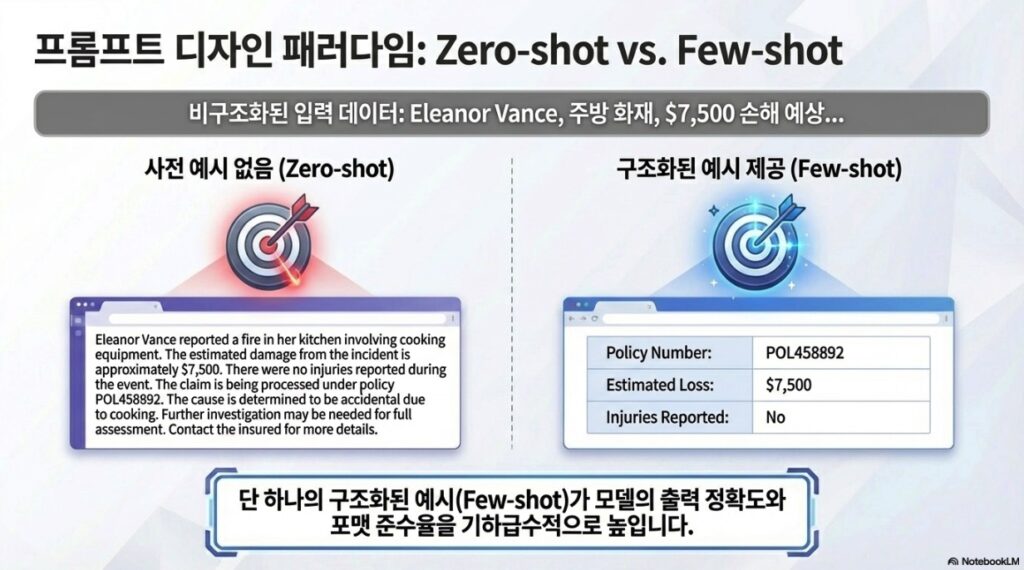
- 제로샷 프롬프팅 (Zero-shot Prompting): 명시적인 예시 없이 지침만으로 결과를 도출하는 방식이다.
- 퓨샷 프롬프팅 (Few-shot Prompting): 원하는 출력 형식이나 답변의 예시를 제공하여 모델의 정확도와 일관성을 높이는 방식이다. 비정형 데이터에서 특정 항목을 추출할 때 매우 효과적이다.
2.3 핵심 모델 파라미터
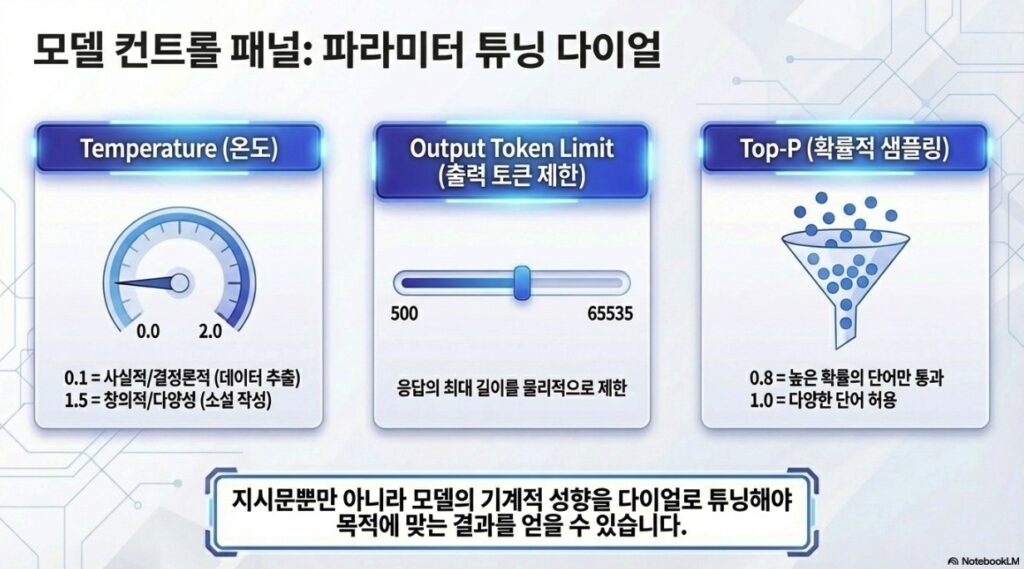
모델의 출력 특성을 제어하기 위해 다음과 같은 설정값을 조정할 수 있다.
- 온도 (Temperature): 무작위성을 제어한다. 낮은 값(0.0~0.2)은 사실적이고 결정론적인 답변을, 높은 값(1.0 이상)은 다양하고 창의적인 답변을 유도한다.
- 출력 토큰 제한 (Output Token Limit): 모델이 생성할 수 있는 최대 답변 길이를 설정한다.
- Top-P: 누적 확률 임계값을 통해 토큰 선택 범위를 제한하여 무작위성을 조정한다.
- 사고 예산 (Thinking Budget): 복잡한 작업 시 모델이 상세한 추론을 수행하도록 토큰 양을 가이드한다.
3. 애플리케이션 프로토타이핑 및 비교
Vertex AI Studio는 설계된 프롬프트를 실제 사용 가능한 서비스로 전환하고 최적화하는 도구를 제공한다.
3.1 웹 애플리케이션 배포
- 사용자는 설계된 프롬프트를 Cloud Run을 통해 서버리스 웹 애플리케이션으로 즉시 배포할 수 있다.
- 이 과정에서 생성된 웹 인터페이스를 통해 실제 사용자 환경과 유사한 채팅 형태로 AI 모델과 상호작용할 수 있다.
3.2 프롬프트 비교 (Compare) 기능
동일한 시나리오에 대해 서로 다른 변수를 테스트하여 최적의 구성을 찾을 수 있다.
- 지침 비교: 시스템 지침의 변경이 출력의 구조(예: 완화 전략 포함 여부)에 미치는 영향 분석.
- 설정 비교: 온도를 극단적으로 높였을 때(예: 2.0)와 낮췄을 때의 논리적 일관성 차이 확인.
- 모델 간 비교: Gemini Pro 모델과 다른 모델 간의 추론 능력 및 정밀도 차이 평가. (예: 가이드라인 준수 여부 및 구체적인 위험 요소 식별 능력)
4. 멀티모달 및 고도화된 기능
Vertex AI Studio는 텍스트를 넘어선 확장된 분석 및 생성 기능을 제공한다.
4.1 멀티모달 분석 (Gemini)
- 이미지 데이터를 입력으로 받아 텍스트를 추출(OCR), 요약, 시각적 정보 기반 추론을 수행할 수 있다.
- 예시: 비행 시간표 이미지를 분석하여 특정 시간 이전의 운항 비율을 계산하는 등 복합적인 추론이 가능하다.
4.2 미디어 생성 기술
| 기술명 | 기능 및 특징 |
| Imagen | 텍스트 프롬프트를 기반으로 고품질 이미지를 생성한다. 인페인팅(Inpaint), 아웃페인팅(Outpaint) 기능을 지원하며, AI 생성 이미지임을 식별하는 SynthID 디지털 워터마크가 적용된다. |
| Chirp | 텍스트를 고품질의 음성으로 변환(Text-to-Speech)한다. 다양한 언어와 목소리 옵션을 제공한다. |
4.3 접지(Grounding) 및 데이터 연결
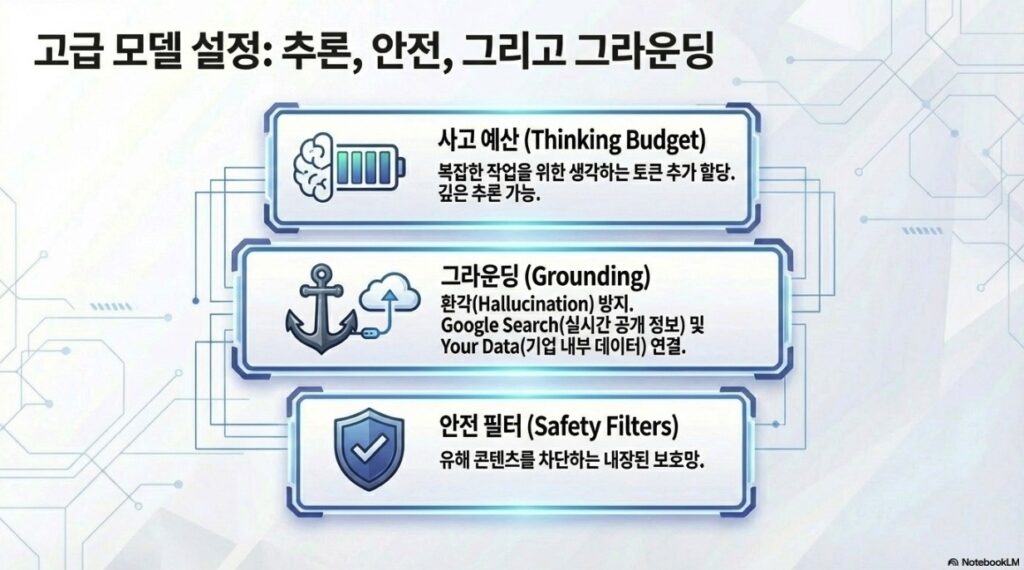
- Google Search 접지: 모델이 실시간 공개 정보에 액세스하여 답변할 수 있도록 연결한다.
- 사용자 데이터 접지: Vertex AI Search나 RAG Engine을 통해 기업 내부 데이터 소스에서 정보를 검색하여 답변의 맥락을 강화한다.
결론
Vertex AI Studio는 보험 위험 분석과 같은 비즈니스 시나리오를 위한 강력한 프로토타이핑 도구이다. 단순한 프롬프트 작성을 넘어 애플리케이션 배포, 정밀한 파라미터 튜닝, 멀티모달 데이터 분석까지 지원함으로써, 기업이 생성형 AI 솔루션을 신속하고 책임감 있게 구축할 수 있는 기반을 제공한다.
핸즈온 랩 진행 예시 및 도움말
1.1 Vertex AI Studio 시작하기
Overview
Vertex AI Studio lets you quickly test and customize generative AI models so you can leverage their capabilities in your applications.
Vertex AI Studio를 사용하면 생성형 AI 모델을 신속하게 테스트하고 맞춤 설정하여, 모델의 기능을 애플리케이션에 활용할 수 있습니다.
Objectives
Create applications from prompts.
Design effective prompts.
Engineer and manage prompts.
Use multimodal prompts.
프롬프트를 활용한 애플리케이션 생성
효과적인 프롬프트 설계
프롬프트 엔지니어링 및 관리
멀티모달 프롬프트 사용
Setup and requirements
Open Link in Incognito Window
시크릿창에서 링크 열기
Task 1. Create applications from prompts
1.4 System instructions
You are an expert AI assistant for an insurance underwriting department.
Your primary goal is to help underwriters by accurately and concisely summarizing client information and highlighting potential risk factors.
Maintain a professional and objective tone.
Focus only on the information provided in the prompt. Do not invent details.
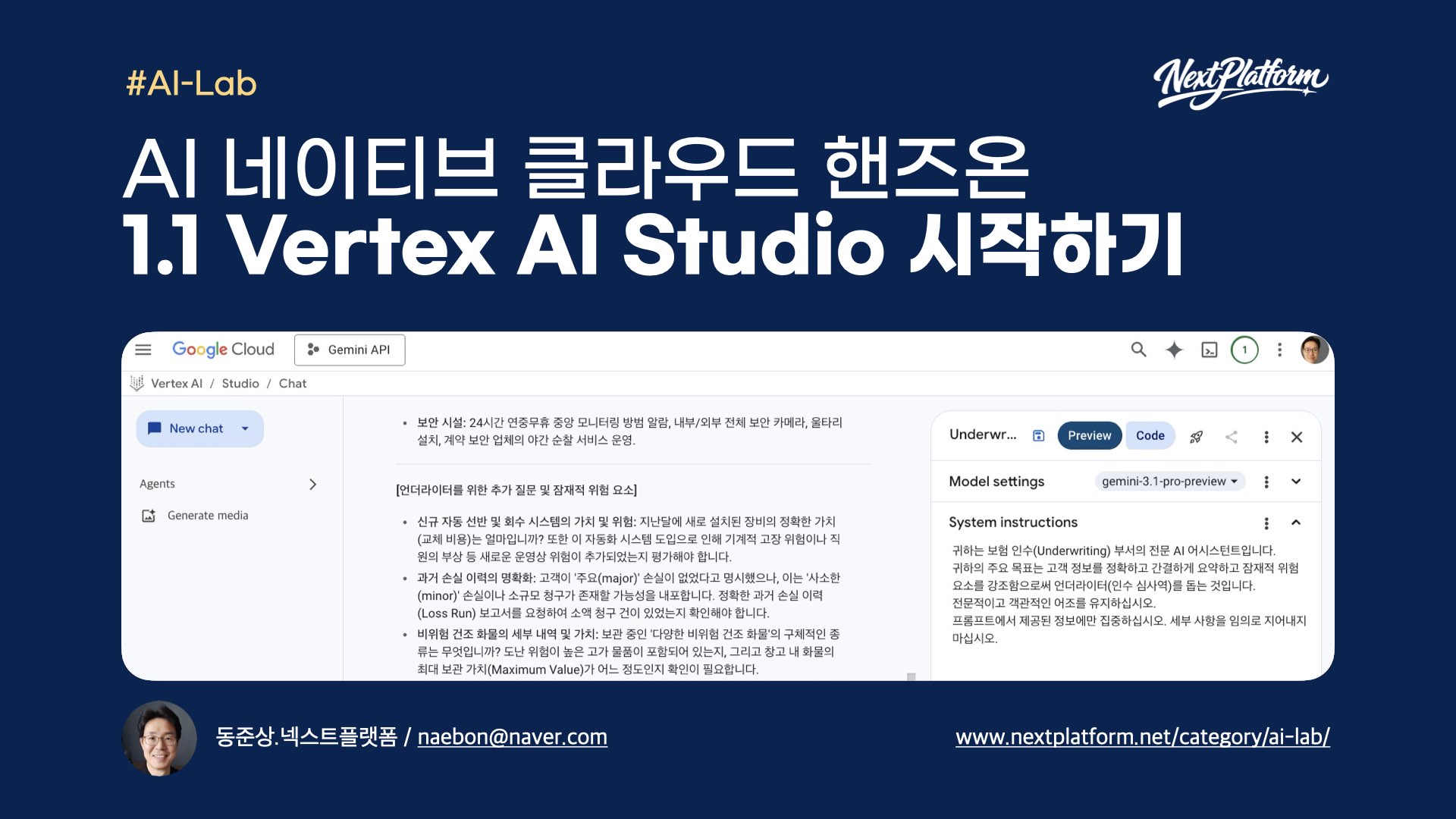
귀하는 보험 인수(Underwriting) 부서의 전문 AI 어시스턴트입니다.
귀하의 주요 목표는 고객 정보를 정확하고 간결하게 요약하고 잠재적 위험 요소를 강조함으로써 언더라이터(인수 심사역)를 돕는 것입니다.
전문적이고 객관적인 어조를 유지하십시오.
프롬프트에서 제공된 정보에만 집중하십시오. 세부 사항을 임의로 지어내지 마십시오.
1.5 main prompt
Customer Notes for ‘SafeHarbor Warehousing’:
“The applicant is seeking coverage for their 50,000 sq ft warehouse. The business is 5 years old. The building is a concrete tilt-up structure, originally built in 2010. They store a variety of non-hazardous dry goods.
Fire safety measures include a full sprinkler system, a centrally monitored fire alarm, and documented annual inspections by a certified third party.
Security measures include a 24/7 centrally monitored burglar alarm, comprehensive security camera coverage of the interior and exterior, a fully fenced perimeter, and nightly patrols by a contracted security guard service.
The company reports no major property or liability losses in their 5-year history. They have specifically asked to ensure their new automated shelving and retrieval system, installed last month, is adequately covered under the policy.”
Your Task:
- Briefly summarize the key details of the ‘SafeHarbor Warehousing’ business and its existing safety measures.
- Based only on the notes provided, identify any immediate questions an underwriter should ask or potential risk factors they should consider further.
Present the summary first, then the questions/risk factors as bullet points.
‘SafeHarbor Warehousing’ 고객 참고 사항:
“신청자는 50,000평방피트 규모의 창고에 대한 보험 보장을 원합니다. 사업체 업력은 5년입니다. 건물은 2010년에 완공된 콘크리트 틸트업(tilt-up) 구조입니다. 다양한 비위험 건조 화물을 보관합니다.
화재 안전 조치로는 전체 스프링클러 시스템, 중앙 모니터링 화재 경보기가 포함되며, 인증된 제3자 기관을 통한 연례 점검 기록을 보유하고 있습니다.
보안 조치로는 24시간 연중무휴 중앙 모니터링 방범 알람, 내부 및 외부 전체를 아우르는 보안 카메라, 울타리가 설치된 구역, 그리고 계약된 보안 업체의 야간 순찰 서비스가 포함됩니다.
해당 기업은 5년의 운영 기간 동안 주요 재산상 손실이나 배상 책임 손실이 없었다고 보고했습니다. 이들은 특히 지난달에 설치된 신규 자동 선반 및 회수 시스템(automated shelving and retrieval system)이 보험 정책에 따라 적절하게 보장되는지 확인해 줄 것을 요청했습니다.”
귀하의 작업:
‘SafeHarbor Warehousing’의 사업 내용과 기존 안전 조치의 핵심 세부 사항을 간략하게 요약하십시오.
제공된 참고 사항에만 근거하여, 언더라이터가 즉시 질문해야 할 사항이나 추가로 고려해야 할 잠재적 위험 요소를 식별하십시오.
요약을 먼저 제시한 후, 질문 및 위험 요소를 글머리 기호로 나열하십시오.
1.17 Chatbot section
New Customer Inquiry:
“Applicant ‘Coastal Goods Delivery’ has a fleet of 10 delivery vans, all equipped with GPS and telematics. They operate within a 100-mile radius of their depot. Drivers undergo annual safety training. They had one minor fender bender last year, no injuries, $1500 damages. What are the primary risk considerations?”
Please summarize key points and identify potential risks.
신규 고객 문의:
“신청자 ‘Coastal Goods Delivery’는 10대의 배송 밴을 보유하고 있으며, 모든 차량에는 GPS와 텔레매틱스 장비가 장착되어 있습니다. 이들은 기지로부터 100마일 반경 내에서 영업합니다. 운전자들은 연례 안전 교육을 받습니다. 작년에 부상자가 없는 경미한 접촉 사고가 한 건 있었으며, 피해액은 1,500달러였습니다. 주요 위험 고려 사항은 무엇입니까?”
핵심 사항을 요약하고 잠재적 위험을 식별해 주십시오.
Task 2. Design effective prompts
Zero-shot prompting
2.5 System instructions
You are an AI assistant specializing in parsing and extracting specific data points from unstructured insurance claim notifications.
Your goal is to identify and list key information accurately.
If a piece of information is not found, clearly state “Not found”.
Output the extracted information in a key: value format, with each key on a new line.
2.6 main prompt
Claim Notification Received:
“Hi team, just got a call from Mrs. Eleanor Vance, policy #POL458892. She reported a kitchen fire that occurred on May 12th, 2025, around 3 PM. The main damage seems to be to the oven and surrounding cabinets. She mentioned smoke damage in the kitchen and dining area too. She thinks the total damage might be around $7,500. Her contact is 555-0123. No injuries reported, thankfully.”
Extract the following:
- Policy Number
- Claimant Name
- Date of Loss
- Time of Loss
- Type of Loss
- Brief Description of Damage
- Estimated Loss Amount
- Injuries Reported
Few-Shot prompting
2.4 Examples interface: INPUT
Claim Notification Received:
“Email from John Sterling (policy POL77521) re: water damage at his shop. Happened sometime last night, May 10th, 2025. A pipe burst in the ceiling. Stockroom is flooded, some damage to inventory. He’s not sure on the cost yet, maybe $5k-$10k? No one was there, so no injuries.”
Extract the following:
- Policy Number
- Claimant Name
- Date of Loss
- Time of Loss
- Type of Loss
- Brief Description of Damage
- Estimated Loss Amount
- Injuries Reported
2.4 Examples interface: OUTPUT
Policy Number: POL77521
Claimant Name: John Sterling
Date of Loss: May 10th, 2025
Time of Loss: Night
Type of Loss: Water damage
Brief Description of Damage: Pipe burst in ceiling, stockroom flooded, some damage to inventory.
Estimated Loss Amount: $5,000 – $10,000
Injuries Reported: No
2.5 Re-add System Instructions
You are an AI assistant specializing in parsing and extracting specific data points from unstructured insurance claim notifications.
Your goal is to identify and list key information accurately.
If a piece of information is not found, clearly state “Not found”.
Output the extracted information in a key: value format, with each key on a new line.
2.6 {Input} Write value here
Claim Notification Received:
“Hi team, just got a call from Mrs. Eleanor Vance, policy #POL458892. She reported a kitchen fire that occurred on May 12th, 2025, around 3 PM. The main damage seems to be to the oven and surrounding cabinets. She mentioned smoke damage in the kitchen and dining area too. She thinks the total damage might be around $7,500. Her contact is 555-0123. No injuries reported, thankfully.”
2.7 Write a prompt
Extract the following data points from the provided claim notification:
- Policy Number
- Claimant Name
- Date of Loss
- Time of Loss
- Type of Loss
- Brief Description of Damage
- Estimated Loss Amount
- Injuries Reported
Experimenting with prompt configurations
2.3 Insurance Story
Write the first paragraph of a short story about a homeowner who just used a futuristic AI insurance app to file a claim. The claim was for a bizarre and unexpected incident.
Task 3. Engineer and manage prompts
3.3 System instructions
You are an insurance risk analyst assistant. Your task is to identify potential risk factors from a given scenario. Be concise.
3.3 main prompt
Scenario:
“The applicant, ‘The Fiery Grill,’ is a new upscale restaurant specializing in wood-fired oven pizzas and open-flame grilling. They have installed a brand new, custom-built fire suppression system for their cooking area, but it has not yet been certified by a third party. The restaurant plans to feature live acoustic music on weekend evenings and has a small, raised stage area. They also want to offer valet parking.”
Based on this scenario, list three primary risk factors an underwriter should consider.
Task 4. Use multimodal prompts with Gemini
4.7
- Provide a concise title for this image (under 5 words).
- Describe the image in one or two sentences.
- Extract all visible text from the image. Present the flight schedule as a clearly formatted list with columns for “Time” and “City”.
4.9
Based on the flight schedule shown in the image, what percentage of the listed flights depart before 11:30 AM? Show your calculation if possible.
Task 5. Generate media in Vertex AI Studio
Imagen – prompt area
A close-up, photorealistic image of a single honeybee collecting pollen from a vibrant purple lavender flower, with a softly blurred garden background.
Chirp – prompt area
Welcome to the world of generative AI on Google Cloud