
2026.04.12 / 동준상.넥스트플랫폼
(AWS SAA, AWS AIF, GCP GenAI Leader)
AI Cloud Hands-on Lab: Building a Chat App Powered by Gemini
핵심 요약 (Executive Summary)
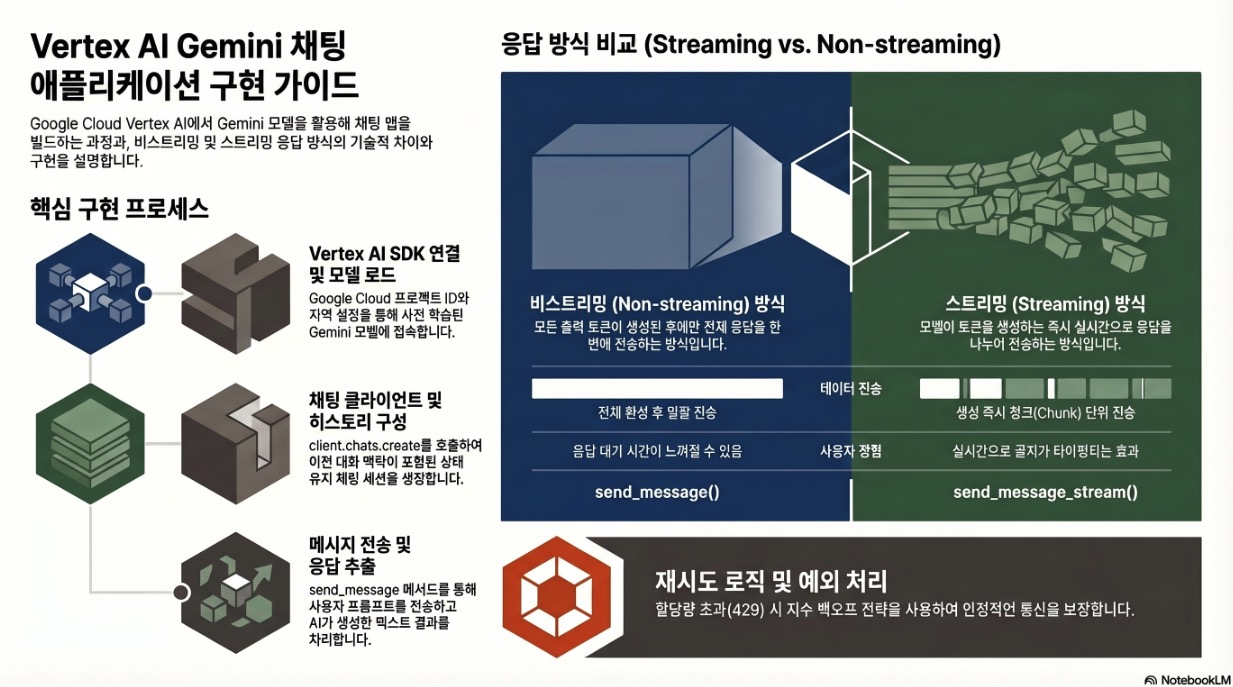
이번 포스트는 Vertex AI 플랫폼상에서 Google의 대규모 언어 모델인 Gemini기반의 채팅 애플리케이션 구축 실습 가이드입니다.
- Vertex AI SDK를 통한 클라이언트 연결, 사전 학습된 Gemini 모델 로드, 그리고 텍스트 프롬프트 전송 및 응답 추출 프로세스 파악
- 응답 생성 방식에 따른 두 가지 접근법인 ‘비스트리밍(Non-streaming)’과 ‘스트리밍(Streaming)’ 방식의 기술적 구현 차이 이해
- 할당량 초과(Quota Exhaustion) 상황에 대비한 재시도 로직(Retry Logic)의 중요성 확인
- 학습자는 Gemini의 상태 유지(Stateful) 대화 능력을 활용하여 지능형 애플리케이션을 안정적으로 구축하는 데 필요한 핵심 인사이트 확보
1. Vertex AI 및 Gemini 모델 통합 기초
Vertex AI(Generative AI on Vertex AI)는 Google의 대규모 생성형 AI 모델에 접근하여 이를 테스트, 조정 및 배포할 수 있는 환경을 제공한다. 애플리케이션 구축의 첫 단계는 Google Cloud AI 플랫폼과의 연결을 설정하는 것이다.
- SDK 및 클라이언트 초기화:
google.genaiSDK를 사용하여 클라이언트를 생성한다. 이때 프로젝트 ID, 리전(Region), API 버전 등의 구성 요소가 필수적으로 정의되어야 한다. - 사전 학습된 모델 활용: 모델을 처음부터 빌드할 필요 없이, 이미 학습된 Gemini 모델(model-id)을 로드하여 즉시 프롬프트 처리에 사용할 수 있다.
- 핵심 인터페이스: 개발자는
client.chats.create메서드를 통해 모델과 대화 세션을 생성하고, 이를 통해 텍스트 입력을 전송하고 응답을 수신한다.
2. 응답 처리 메커니즘: 스트리밍 vs. 비스트리밍
애플리케이션의 요구사항과 사용자 경험 설계에 따라 두 가지 응답 수신 방식을 선택할 수 있다.
2.1 비스트리밍 응답 (Non-streaming)
- 동작 방식: 모델이 모든 출력 토큰을 완전히 생성한 후에만 전체 응답을 단일 객체로 전송한다.
- 구현 메서드:
chat.send_message()를 사용한다. - 특징: 구현이 단순하며, 전체 응답이 확정된 후 처리가 필요한 경우에 적합하다.
2.2 스트리밍 응답 (Streaming)
- 동작 방식: 모델이 출력 토큰을 생성하는 즉시 실시간으로 전송한다. 사용자는 응답이 완성될 때까지 기다리지 않고 생성되는 과정을 순차적으로 확인할 수 있다.
- 구현 메서드:
chat.send_message_stream()을 사용한다. - 특징: 대화형 인터페이스에서 응답 지연 시간을 시각적으로 단축시키는 효과가 있다. 반복문(for chunk in …)을 통해 생성되는 텍스트 조각(chunk)을 실시간으로 결합하여 처리한다.
소스 코드: SendChatwithoutStream.py
import time
from google import genai
from google.genai.types import HttpOptions, ModelContent, Part, UserContent

import logging
from google.cloud import logging as gcp_logging
from google.genai.errors import ClientError

# ------  Below cloud logging code is for Qwiklab's internal use, do not edit/remove it. --------
# Initialize GCP logging
gcp_logging_client = gcp_logging.Client()
gcp_logging_client.setup_logging()

client = genai.Client(
  vertexai=True,
  project='"project-id"',
  location='"REGION"',
  http_options=HttpOptions(api_version="v1")
)

# Configuration for retry logic
MAX_RETRIES = 3
INITIAL_DELAY = 2

for attempt in range(MAX_RETRIES + 1):
  try:
    chat = client.chats.create(
      model="model-id",
      history=[
        UserContent(parts=[Part(text="Hello")]),
        ModelContent(
          parts=[Part(text="Great to meet you. What would you like to know?")],
        ),
      ],
    )
    response = chat.send_message("What are all the colors in a rainbow?")
    print(response.text)

    response = chat.send_message("Why does it appear when it rains?")
    print(response.text)
    break
  except ClientError as e:
    if "429" in str(e) or "RESOURCE_EXHAUSTED" in str(e):
      if attempt < MAX_RETRIES:
        delay = INITIAL_DELAY * (2 ** attempt)
        print(f"Warning: Resource exhausted (429). Retrying in {delay} seconds... (Attempt {attempt + 1}/{MAX_RETRIES})")
        time.sleep(delay)
      else:
        print("I am currently experiencing high demand due to quota exhaustion. Please wait for a while and try again.")
  finally:
    # Verify if the process concluded without a response object being created
    if 'response' not in locals() and attempt == MAX_RETRIES:
      print("Final Status: Process terminated unsuccessfully.")
코드 실행 결과
root@f784672aeb7a:/home/student# /usr/bin/python3 /SendChatwithoutStream.py
The classic and most commonly recognized colors of the rainbow, in order from the outermost (longest wavelength) to the innermost (shortest wavelength), are:

1.  **Red**
2.  **Orange**
3.  **Yellow**
4.  **Green**
5.  **Blue**
6.  **Indigo**
7.  **Violet**

You can remember them with the mnemonic **ROY G. BIV**.

It's important to remember that a rainbow is actually a continuous spectrum of light, meaning there's a smooth transition between all the colors. These seven colors are how we've chosen to categorize and name distinct bands within that continuous spectrum. Historically, Sir Isaac Newton was influential in defining these seven distinct colors from the spectrum.
Rainbows appear when it rains because of a fascinating combination of **sunlight, water droplets, and the physics of light**.

Here's a breakdown of the process:

1.  **You Need Sunlight:** Rainbows are all about light. The sun provides the white light that is made up of all the colors of the spectrum.

2.  **You Need Water Droplets:** Rain is essential because it provides the tiny, spherical prisms that interact with the sunlight. Fog, mist, or even a garden hose can also create rainbows if the conditions are right.

3.  **The Journey of Light Through a Droplet:**
    *   **Refraction (Bending Light In):** When sunlight (white light) enters a raindrop, it slows down and bends. This bending is called **refraction**.
    *   **Dispersion (Separating Colors):** Crucially, different colors of light bend at slightly different angles. Violet light bends the most, and red light bends the least. This causes the white light to split into its individual colors, just like a prism does.
    *   **Reflection (Bouncing Light Back):** After entering and splitting, the light travels to the back of the raindrop. There, it hits the inner surface and reflects back, like a tiny mirror.
    *   **Second Refraction (Bending Light Out):** As the separated colors of light exit the raindrop, they bend again (another refraction), further dispersing and fanning out.

4.  **The Observer's Position is Key:**
    *   **Sun Behind You:** To see a rainbow, the sun must always be *behind* you, shining over your shoulder. The rain needs to be *in front* of you.
    *   **Angle of Light:** Each raindrop acts like a tiny projector, sending a specific color of light to your eye at a very precise angle. Red light is reflected at about 42 degrees from the anti-solar point (the point directly opposite the sun in the sky), and violet light at about 40 degrees.
    *   **The Arc Shape:** Because these angles are constant, you see an arc. Every droplet at the correct angle relative to your eye and the sun will contribute to the rainbow you see. Since each person sees the rainbow from their unique perspective, no two people see *exactly* the same rainbow.

In essence, individual raindrops act like millions of tiny prisms, taking sunlight, splitting it into its component colors, and reflecting those colors back towards your eyes, creating the beautiful arc we call a rainbow.
소스 코드: SendChatwithStream.py
import time
from google import genai
from google.genai.types import HttpOptions

import logging
from google.cloud import logging as gcp_logging
from google.genai.errors import ClientError

# ------  Below cloud logging code is for Qwiklab's internal use, do not edit/remove it. --------
# Initialize GCP logging
gcp_logging_client = gcp_logging.Client()
gcp_logging_client.setup_logging()

client = genai.Client(
  vertexai=True,
  project='"project-id"',
  location='"REGION"',
  http_options=HttpOptions(api_version="v1")
)
chat = client.chats.create(model="model-id")
response_text = ""

# Configuration for retry logic
MAX_RETRIES = 3
INITIAL_DELAY = 2

for attempt in range(MAX_RETRIES + 1):
  try:
    for chunk in chat.send_message_stream("What are all the colors in a rainbow?"):
      print(chunk.text, end="")
      response_text += chunk.text
    break
  except ClientError as e:
    if "429" in str(e) or "RESOURCE_EXHAUSTED" in str(e):
      if attempt < MAX_RETRIES:
        delay = INITIAL_DELAY * (2 ** attempt)
        print(f"Warning: Resource exhausted (429). Retrying in {delay} seconds... (Attempt {attempt + 1}/{MAX_RETRIES})")
        time.sleep(delay)
      else:
        print("I am currently experiencing high demand due to quota exhaustion. Please wait for a while and try again.")
  finally:
    # Verify if the process concluded without a response object being created
    if not response_text and attempt == MAX_RETRIES:
      print("Final Status: Process terminated unsuccessfully.")
코드 실행 결과
root@f784672aeb7a:/home/student# /usr/bin/python3 /SendChatwithStream.py
The colors in a rainbow are, in order from the outermost to the innermost (or top to bottom, depending on the rainbow's arc):

1.  **Red**
2.  **Orange**
3.  **Yellow**
4.  **Green**
5.  **Blue**
6.  **Indigo**
7.  **Violet**

This sequence is often remembered by the acronym **ROYGBIV**.

It's important to remember that a rainbow is actually a **continuous spectrum** of light, meaning the colors gradually blend into one another without distinct boundaries. The seven colors listed are a way to categorize and simplify this continuous range, traditionally attributed to Isaac Newton.
3. 상태 유지 대화 및 컨텍스트 관리
Gemini 모델은 이전 대화 내용을 기억하고 문맥에 맞는 응답을 생성하는 ‘상태 유지(Stateful)’ 대화 능력을 갖추고 있다.
- 대화 기록(History) 설정:
history매개변수를 사용하여 모델에 이전 대화 문맥을 주입할 수 있다. 이는UserContent(사용자 입력)와ModelContent(모델의 이전 응답)의 쌍으로 구성된다. - 상호작용 흐름: 초기 대화 설정 후
send_message또는send_message_stream을 호출하면 모델은 제공된 기록과 현재 프롬프트를 결합하여 최적의 답변을 도출한다.
4. 시스템 안정성 및 오류 처리 전략
AI 서비스 호출 시 발생할 수 있는 리소스 제한 및 네트워크 오류에 대응하기 위해 견고한 예외 처리 로직이 필수적이다.
- 리소스 소진(429 Error) 대응: 높은 수요로 인해
RESOURCE_EXHAUSTED오류가 발생할 경우를 대비하여 지수 백오프(Exponential Backoff) 기반의 재시도 로직을 적용한다.- 최대 재시도 횟수(MAX_RETRIES): 기본 3회 설정.
- 대기 시간 계산: 실패 횟수가 반복될수록 대기 시간을 배수로 증가시켜(
INITIAL_DELAY * (2 ** attempt)) 시스템 부하를 조절한다.
- 최종 상태 확인: 모든 재시도 시도가 실패할 경우, 프로세스가 성공적으로 완료되지 않았음을 사용자에게 알리고 세션을 종료하는 안전 장치를 포함한다.
결론 및 시사점
Vertex AI와 Gemini 모델 기반의 애플리케이션 개발은 생성형 AI 기능을 소프트웨어 프로젝트에 통합할 수 있는 효율적인 방법이 될 수 있음.
- 유연성: 스트리밍 및 비스트리밍 방식을 지원하여 다양한 서비스 시나리오에 대응 가능
- 지능형 대화: 대화 기록 관리를 통해 단순 질의응답을 넘어선 고도화된 챗봇 구현이 가능
- 신뢰성: 클라이언트 측의 재시도 로직 구현을 통해 클라우드 리소스 제한 상황에서도 서비스의 연속성 확보 가능