
2026.01.23 / JUN.NXP
핵심 정리
Flutter 웹앱을 Vercel에 배포하는 과정에서 발생한 오류들과 해결 방법을 정리했어요. Cursor로 1차 빌드 후 기본적인 UI 요소의 수정 버전을 Vercel에 배포하는 작업이었고 배포 성공까지 대략 세 시간 정도 소요됐습니다.
Vercel 배포 오류 문제를 해결한 Flutter 앱
https://saju-daewoon.vercel.app
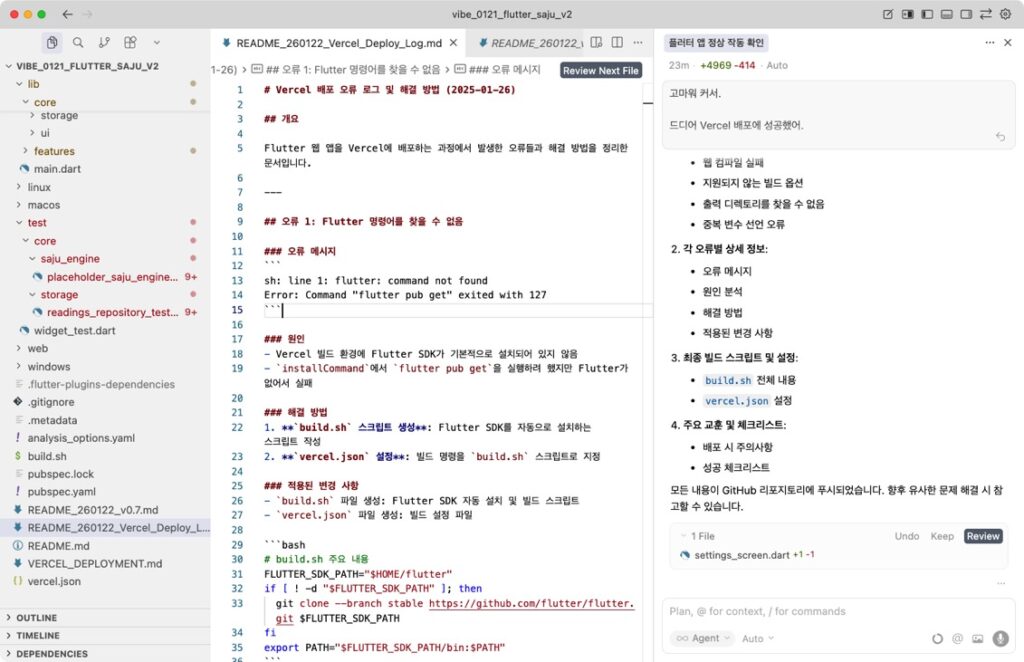
- Flutter SDK 자동 설치 문제: Vercel 빌드 환경에 Flutter가 없으므로 빌드 스크립트에서 자동 설치 필요
- SDK 버전 유연성 문제:
pubspec.yaml의 SDK 버전 요구사항을 유연하게 설정 (>=3.0.0 <4.0.0) - pubspec.lock 제외 문제:
pubspec.lock을 Git에서 제외하여 항상 최신 SDK에 맞게 의존성 재해결 - 코드 생성 필수 문제:
freezed와json_serializable사용 시build_runner실행 필수 - 옵션 확인 문제: 최신 Flutter 버전에서 제거된 옵션 확인 필요
- 변수 이름 문제: Dart에서 같은 스코프의 변수 이름 중복 불가
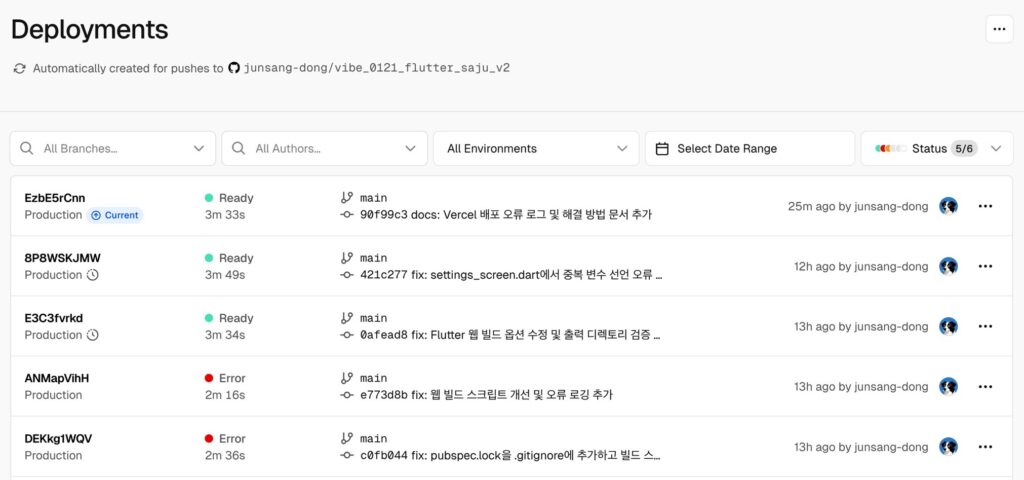
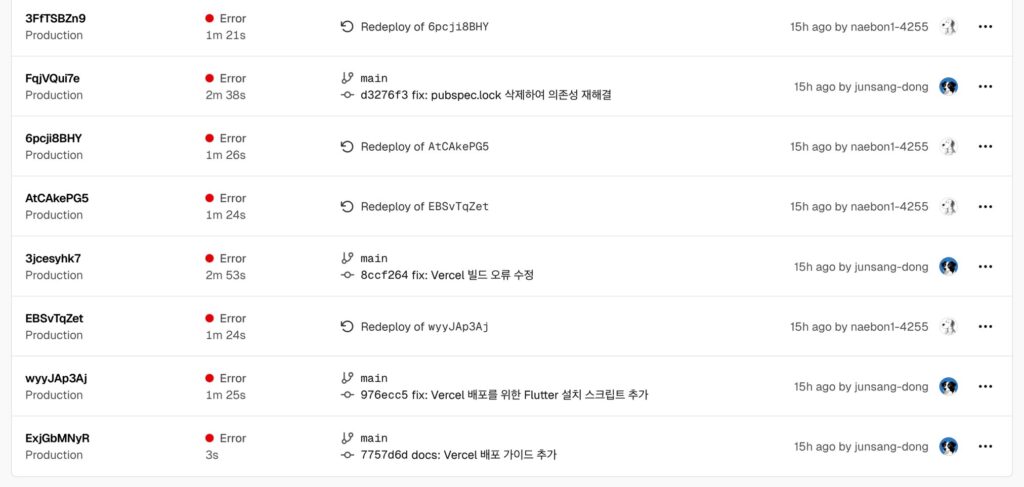
Flutter 웹앱 Vercel 배포 성공 체크리스트
- Flutter SDK 자동 설치
- SDK 버전 요구사항 수정
- pubspec.lock 제거 및 .gitignore 추가
- 코드 생성 단계 추가
- 지원되지 않는 옵션 제거
- 출력 디렉토리 검증
- 컴파일 오류 수정
- 빌드 성공 및 배포 완료
오류 1: Flutter 명령어를 찾을 수 없음
오류 메시지
sh: line 1: flutter: command not found
Error: Command "flutter pub get" exited with 127
원인
- Vercel 빌드 환경에 Flutter SDK가 기본적으로 설치되어 있지 않음
installCommand에서flutter pub get을 실행하려 했지만 Flutter가 없어서 실패
해결 방법
build.sh스크립트 생성: Flutter SDK를 자동으로 설치하는 스크립트 작성vercel.json설정: 빌드 명령을build.sh스크립트로 지정
적용된 변경 사항
build.sh파일 생성: Flutter SDK 자동 설치 및 빌드 스크립트vercel.json파일 생성: 빌드 설정 파일
# build.sh 주요 내용
FLUTTER_SDK_PATH="$HOME/flutter"
if [ ! -d "$FLUTTER_SDK_PATH" ]; then
  git clone --branch stable https://github.com/flutter/flutter.git $FLUTTER_SDK_PATH
fi
export PATH="$FLUTTER_SDK_PATH/bin:$PATH"
오류 2: Dart SDK 버전 불일치
오류 메시지
The current Dart SDK version is 3.0.3.
Because daewoon requires SDK version ^3.10.4, version solving failed.
Error: Command "bash build.sh" exited with 1
원인
pubspec.yaml에서sdk: ^3.10.4로 설정되어 있었지만, Flutter 3.10.4에 포함된 Dart SDK는 3.0.3- Dart SDK 버전 요구사항이 실제 Flutter 버전과 맞지 않음
해결 방법
pubspec.yaml수정: SDK 버전 요구사항을 더 유연하게 변경
   environment:
sdk: '>=3.0.0 <4.0.0' # 이전: ^3.10.4build.sh개선: 최신 stable Flutter 사용 및 업데이트
   # 특정 버전 대신 최신 stable 사용
   git clone --branch stable https://github.com/flutter/flutter.git $FLUTTER_SDK_PATH
   flutter upgrade --force
오류 3: pubspec.lock의 이전 SDK 버전 고정
오류 메시지
The current Dart SDK version is 3.0.3.
Because daewoon requires SDK version ^3.10.4, version solving failed.
원인
pubspec.yaml은 수정되었지만,pubspec.lock파일이 Git에 포함되어 이전 SDK 버전(^3.10.4)을 고정- Vercel 빌드 시 이 파일로 인해 의존성 해결 실패
해결 방법
pubspec.lock을 Git에서 제거
git rm --cached pubspec.lock.gitignore에 추가
pubspec.lock- 빌드 스크립트에서 삭제
rm -rf pubspec.lock .dart_tool참고
pubspec.lock은 로컬 빌드 결과물이므로 버전 관리에서 제외하는 것이 좋습니다- Vercel 빌드 시 항상 최신 SDK 버전에 맞게 의존성을 재해결하도록 함
오류 4: 웹 컴파일 실패
오류 메시지
Compiling lib/main.dart for the Web...                             66.2s
Error: Failed to compile application for the Web.
Error: Command "bash build.sh" exited with 1
원인
- 구체적인 오류 메시지가 없어 원인 파악이 어려움
- 코드 생성(
build_runner)이 누락되었을 가능성 - 빌드 로그가 충분하지 않음
해결 방법
- 코드 생성 단계 추가
flutter pub run build_runner build --delete-conflicting-outputs- 빌드 전 정리
flutter clean- 상세 로깅 추가
flutter build web --release 2>&1 | tee build.log- 오류 발생 시 로그 출력
   if [ ! -d "build/web" ]; then
     echo "Error: build/web directory not found!"
     tail -100 build.log
     exit 1
   fi
오류 5: 지원되지 않는 빌드 옵션
오류 메시지
Could not find an option named "--web-renderer".
Run 'flutter -h' (or 'flutter <command> -h') for available flutter commands and options.
원인
- 최신 Flutter 버전에서
--web-renderer옵션이 제거됨 --dart-define=FLUTTER_WEB_USE_SKIA=true옵션도 더 이상 필요하지 않음
해결 방법
- 지원되지 않는 옵션 제거
  # 이전
  flutter build web --release --web-renderer canvaskit --dart-define=FLUTTER_WEB_USE_SKIA=true

  # 수정 후
  flutter build web --release
오류 6: 출력 디렉토리를 찾을 수 없음
오류 메시지
Build completed successfully!
Error: No Output Directory named "web" found after the Build completed.
Update vercel.json#outputDirectory to ensure the correct output directory is generated.
원인
- 빌드는 성공했지만 Vercel이 출력 디렉토리를 찾지 못함
vercel.json의outputDirectory설정이 잘못되었거나 빌드 출력 경로가 다름
해결 방법
- 출력 디렉토리 검증 추가
   echo "Verifying build output..."
   if [ ! -d "build/web" ]; then
     echo "Error: build/web directory not found!"
     ls -la build/ || echo "build/ directory does not exist"
     exit 1
fivercel.json확인
   {
     "outputDirectory": "build/web"
   }
오류 7: 중복 변수 선언 오류
오류 메시지
lib/features/settings/settings_screen.dart:100:24:
Error: '_' is already declared in this scope.
            error: (_, _) => const SizedBox(),
                       ^
lib/features/settings/settings_screen.dart:100:21:
Info: Previous declaration of '_'.
            error: (_, _) => const SizedBox(),
                    ^
원인
- Dart에서는 같은 스코프에서 같은 이름의 변수를 중복 선언할 수 없음
error: (_, _)에서 두 개의_파라미터를 사용하여 오류 발생
해결 방법
- 두 번째 파라미터 이름 변경
  // 이전
  error: (_, _) => const SizedBox(),

  // 수정 후
  error: (_, __) => const SizedBox(),
Flutter-Vercel 배포 오류 문제를 해결한 최종 배포 코드
최종 빌드 스크립트 (build.sh)
#!/bin/bash
set -e

echo "Installing Flutter..."
FLUTTER_SDK_PATH="$HOME/flutter"

if [ ! -d "$FLUTTER_SDK_PATH" ]; then
  echo "Downloading Flutter SDK (latest stable)..."
  git clone --branch stable https://github.com/flutter/flutter.git $FLUTTER_SDK_PATH
fi

export PATH="$FLUTTER_SDK_PATH/bin:$PATH"

echo "Updating Flutter..."
flutter upgrade --force

echo "Flutter version:"
flutter --version

echo "Enabling Flutter web..."
flutter config --enable-web

echo "Cleaning pubspec.lock and .dart_tool to ensure fresh dependency resolution..."
rm -rf pubspec.lock .dart_tool

echo "Getting Flutter dependencies..."
flutter pub get --no-example

echo "Running code generation if needed..."
flutter pub run build_runner build --delete-conflicting-outputs || echo "Code generation skipped or failed"

echo "Cleaning previous build..."
flutter clean

echo "Building Flutter web..."
flutter build web --release 2>&1 | tee build.log || {
  echo "Build failed. Last 100 lines of build log:"
  tail -100 build.log
  exit 1
}

echo "Verifying build output..."
if [ ! -d "build/web" ]; then
  echo "Error: build/web directory not found!"
  echo "Available directories in build/:"
  ls -la build/ || echo "build/ directory does not exist"
  exit 1
fi

echo "Build output verified: build/web exists"
echo "Build completed successfully!"
최종 vercel.json 설정
{
  "version": 2,
  "buildCommand": "bash build.sh",
  "outputDirectory": "build/web",
  "installCommand": "echo 'Skipping install, handled in build script'",
  "framework": null,
  "rewrites": [
    {
      "source": "/(.*)",
      "destination": "/index.html"
    }
  ]
}